Links are a core part of how the internet works. They allow people to navigate the digital landscape. And as anyone who has ever worked with SEO knows, links are crucial to a website’s ranking in search results.
Links allow search engines like Google to index and rank your pages. If you want to reach the top of Google’s SERPS, it is crucial that you actively work on link building.
However, many typically refer to the targeted acquisition of external links. But something at least as important is the acquisition of internal links aka. internal link building. But what is a good internal link structure? And how can you best build internal links?
What is internal link building?
Internal link building is about building internal links, typically hyperlinks that connect pages within the same domain (your own website). They are different from external links, which connect your website to other websites.
This means that you link internally from individual subpages to other pages using relevant anchor texts.
There are generally many internal linking options on most websites. An internal link can be expressed in many different ways, from sitewide links to hyperlinks. For example, it can be a link on a product that links to a specific product category.
It can also be a text link in a blog post like ‘See more‘, ‘[keyword/product/service]’, etc. Mainly, we are talking about text links (in-text) when we talk about internal link building.
Why work with internal links?
Working with internal links is an important part of SEO and the usability of your website. Internal links help them find and index all of your pages, even those that may not be directly linked to from the main menu. A good internal link structure ensures that no pages are “lost” to search engines.
Additionally, relevant internal links are important for two main reasons: They help visitors navigate your website. They also help search engines index and understand your pages. There are several good reasons why you should actively work with internal links.
Better understanding of your website
A good internal link structure helps Google’s bot understand the website’s navigational structure and the hierarchical information structure of the content. By inserting internal links purposefully, you can tell Google’s crawler which pages are important in your content universe. And what the relationship is between them.
Easier indexing
Internal links make it easier for Google to find and index your content. By linking to other relevant pages, you can help Google index your content more efficiently. This is especially beneficial if you have a large website with many pages, products, and the like, as it makes better use of your crawl budget.
Internal links make it easier for Google to find and index your content. By linking to other relevant pages, you can help Google index your content more efficiently. This is especially beneficial if you have a large website with many pages, products, and the like, as it makes better use of your crawl budget.
Link juice
In addition to indicating the relationship between your content, internal links also pass “link juice” from one page to another. Google considers external links to be “votes” from other websites. They are considered a sign of recognition and a reflection of a page’s credibility.
Link juice is used as a kind of metaphor for the value of “votes”. By doing internal link building, you can pass on some of the “link value” from a page with many “votes” to another with fewer. And in that way, you also tell Google which pages are important.
Typically, your front page will have the most links, most likely text links and/or navigation links from the main menu (sitewide) to your business pages (service pages, product categories, etc.).
Increased usability and a better user experience
By building internal links, you make it easier for your visitors to find the information they are looking for. If you have a blog post that is relevant to another page on your site, adding an internal link will help users discover more of your content.
The advantage of this is twofold:
- First, internal links can help you improve your website’s bounce rate.
- Finally, they can also help visitors discover quality content, which can result in more conversions and sales.
Important part of any successful SEO strategy
Whether you run a large webshop or a smaller content universe, internal link building will benefit your SEO efforts. Google is increasingly prioritizing a good user experience regardless of the size of the website or webshop.
Reap the benefits of good information structure and navigation. If you expect to scale your website with new content, it only makes sense to actively work on internal link building, as it helps your organic rankings.
But a link is not just a link!
As a discipline, internal link building is similar to external link building in many ways. There are some tested best practices and precautions that you should always work from. Below you will find 10 useful tips and advice on how to make your internal link building strategy a success.
The 10 most important tips for better internal link building
- Always create natural and contextual links.
- Your main menu should always link to your most important business pages.
- Avoid having a crawl depth longer than 3 clicks from the front page on your pages.
- Remember to use anchor texts with relevant keywords in different variations and types so that you don’t over-optimize (the 80/20 rule on exact match).
- It is recommended to have a maximum of 5-10 internal links per 2000 words or 1-3 links per 500 words.
- Link max. 1 time from the same page to another and don’t use the same anchor texts for two different pages.
- Link strategically and funnel-based from posts and subpages to your business pages.
- Use breadcrumbs on your pages for better user experience if you have many levels of navigation.
- Do not build links from subpages to the front page.
- Avoid or limit linking to pages in your navigation menu.
By following these 10 commandments, you can be sure that your internal link building strategy will add value to your overall SEO efforts.
In the final sections, we will cover the use of anchor texts, placement of internal links, the relationship between internal links and indexing in Google, and how to measure success with internal links.
Anchor texts
A classic example of anchor text is the well-known in-text hyperlink. In other words, the anchor text is the same as the link text. When creating internal links, make sure to use descriptive anchor text that accurately reflects the page you are linking to.
For example, if you are linking to a page about summer activities, DO NOT use the anchor text “click here”.
Instead, use something like “summer activities” or “fun ideas for summer” as your anchor text. Or consider another relevant LSI keyword.
By using more descriptive anchor text, you not only make it easier for visitors to navigate your site, but you also improve search engine understanding of your site.
Likewise, a varied use of anchor texts helps you keep your internal link profile natural.
Where should I place internal links?
When building internal links, it’s crucial to make them as natural and relevant as possible. It’s about placing them where they make the most sense for both visitors and search engines.
Link from words or phrases in your text that are relevant to the page you are linking to. Avoid forcing links in, but make sure they make sense in context.
We recommend that you spread the majority of your links naturally and relevantly out in the middle of the page and place 1 or 2 links at the beginning.
This can help Google crawl your most important content faster. It can also help you increase time spent on your page and reduce bounce rate by giving visitors more content to check out.
Think funnel-based
Remember to think funnel-based when inserting links. The same goes for what type of content you mess with. Internal links can help, but they can also hurt your conversion rates by leading people away to other content.
Therefore, use them strategically on your website.
👉Limit the use of internal links or avoid them altogether on sales pages (the fewer links, the less friction).
👉 Use internal links as recommended in blog posts and articles. Remember 1 relevant link in the bound (CTA section). You can quickly find internal link options by, among other things, going to Google and using the following search operator in the search bar: intext:”your keyword” site:https://yourdomain.com/.
How many internal links does my content need to have to be indexed?
The number of internal links new content needs to be indexed varies from website to website. There is no universal number for the number.
To increase your success rate, we recommend that you mix internal links from your most authoritative pages and subpages. We have seen success using at least 3-4 internal links . Make more as needed.
Internal links are unfortunately only one piece of the puzzle…
Become an indexing shark with our: 5 strategies for getting content indexed in Google.
How can you measure the effect of your internal link structure?
There are several ways to measure the impact and development of your internal linking. One way to measure the success of your internal linking structure is to use Google Analytics or other web analytics tools to track the behavior of your visitors.
You should be able to identify the pages that receive the most traffic and the pages that have the highest bounce rate.
If your visitors click on your internal links and stay on your website for longer, it can indicate a positive user experience and increased engagement. It can also result in lower bounce rates and higher conversion rates, as users are more likely to explore your website and take desired actions.
See the behavior from other pages to your relevant pages in Google Analytics
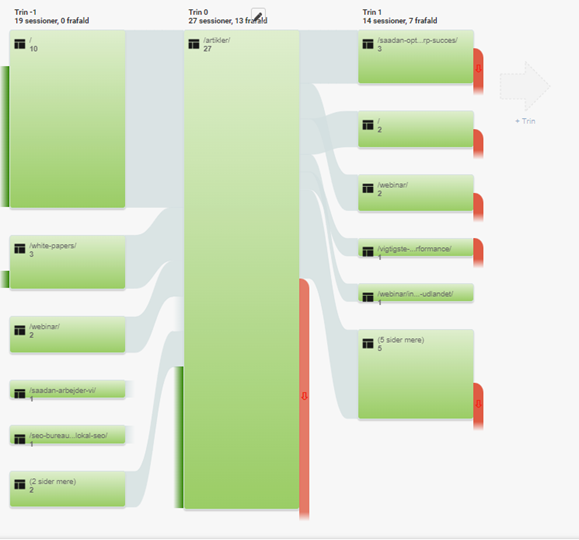
You can see your visitors’ behavior and how they navigate to important pages by going to Behavior → Behavior Flow in Google Analytics. You’ll get an overview of the traffic to and from the different pages, where visitors drop off from, and where they’re looking to go.

If you want to examine a flow in more detail, you can click on the flow in question and select ‘Explore traffic from here‘, after which you can see how your visitors use internal links from your most visited pages to other pages.