
Google’s crawl budget is one of the most important factors that is often overlooked when thinking about SEO. If you own a large website or webshop, it is important to understand what crawl budget is and how it affects your digital business.
In fact, many digital marketers consider crawl budget to be something we have little control over. But that couldn’t be further from the truth! If you run a small or medium-sized website, it can be beneficial to work with your crawl budget.
But if you run a large E-commerce business or a content universe, you should pay extra attention to your crawl budget.
What is crawl budget?
If you own a website, it’s important to understand what crawl budget is and how it can affect your website.
A crawl budget refers to the number of pages that a search engine (e.g. Google) crawls at any given time. It is essentially a limit on how often and how deeply a search engine will crawl your website.
The budget is typically influenced by many different factors, the following being some classic examples:
-
- The URL structure
-
- Navigation structures
-
- Number of technical errors (404 etc.)
-
- Website size
-
- The number of inbound links
-
- Server speed
-
- No-index tags in sitemap
How does crawl budget affect my website?
The crawl budget affects your website by determining how often and how many of your pages search engines like Google can crawl and thus index. If your crawl budget is limited, it can mean that new pages or updated content are not discovered. But also that less important pages (non-commercial) are not crawled at all.
As a result, it may take longer for new and updated content to be indexed. In other words, your content, product, etc. will not be found in Google. On the other hand, if your crawl budget is too high, it can put a strain on your server.
As a result, it may take longer for new and updated content to be indexed. In other words, your content, product, etc. will not be found in Google. On the other hand, if your crawl budget is too high, it can put a strain on your server.
Can I see my crawl budget?
By default, you can’t see your exact crawl budget allocated by Google. They don’t share this specific information directly. However, you can get a sense of how Google crawls your website and thus indirect insight into your crawl budget by using Google Search Console.
In Google Search Console, you can find Indexing Reports, and specifically under “Settings” you will find the “Crawling Statistics” report. Here you can see:
- Number of crawl requests per day: This gives you insight into how actively Googlebot is crawling your website.
- Total download size (in bytes): Shows how much data Googlebot downloads from your website daily.
- Average Response Time: Indicates how long it takes for your server to respond to Google bot requests.
Log file analysis
Alternatively, you can also go in and examine your server log. A log entry is added to your access log file every time Google bot visits your website.
We recommend that you use an automated tool like Screaming Frog or SemRush to do a log file analysis of how many times Google bot crawls your website. You can typically find your access log file with your server provider.
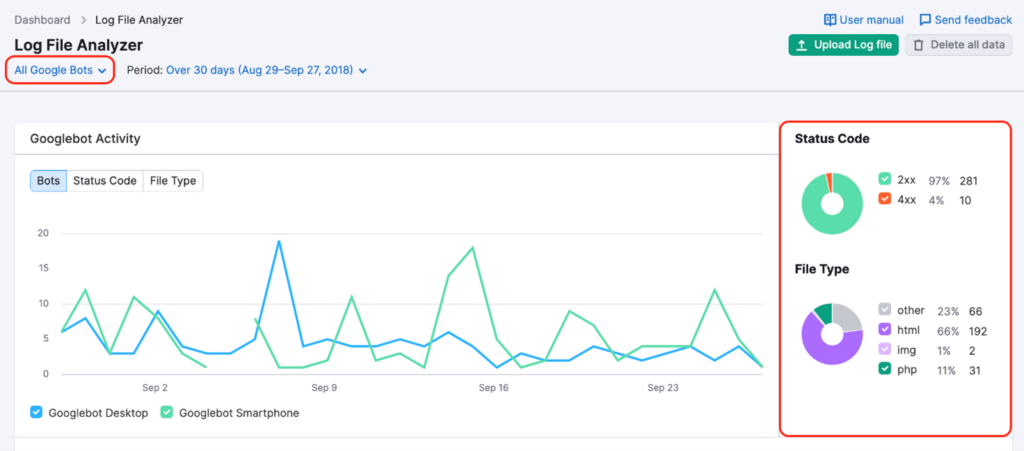
(SemRush Log File Analyzer Overview)
When you find the number of crawls by Google bot, you can take the number of web pages on your website and divide it by the average number of Google bot crawls. If you have 3 or more pages that Google crawls, you should actively work on optimizing your crawl budget.
This can cause you problems in the long run if you have a significant amount of content that fails to be indexed. But having said that, how do you optimize your crawl budget?
How to get the shovel under your crawl budget
When it comes to improving crawl budget, there are a number of different things you can work on to optimize your crawl rate. Below are some key examples of areas you can improve to improve your crawl budget.
-
- Fix http status error
-
- Improve your internal link structure
-
- Keep your XML sitemap up to date and simple
-
- Limit duplicate and redundant content
-
- Speed optimize your loading times
-
- Limit crawl rate
-
- Correct use of Hreflang
Fix http status error
Every URL that Google bot crawls, including CSS and JavaScript files, uses some of your crawl budget. Pages that return error messages like 404 and 503 statuses especially negatively impact crawl budget.
Screaming Frog is a great tool when it comes to finding pages with dead links and the like. Fix any 404 errors you find so they return an http status of 200 (ok). Alternatively, you can create a permanent redirect (301).
NB! Be aware that redirect chains like (https:yourdomain.com -> https:yourdomain.com), can give you multiple redirects all over the place, limiting your crawl budget.
Improve your internal link structure
Internal link building is a good and quick way to improve your crawl budget. Internal links tell Google bot which pages are important. If you are talking about in-text links, it is important to choose an anchor text that describes what the linked page is about.
By linking internally to relevant pages, you can improve your link structure and avoid orphan pages. Finally, it is important that you don’t link around unnaturally like a madman, but actually link relevantly and user-friendly.
NB: We recommend that you only create 1 exact in-text internal link per page.
Keep your XML sitemap up to date and simple
XML sitemaps are a significant help when it comes to ensuring that your website is properly crawled and indexed in Google. Essentially, an XML sitemap tells search engines about the organization of your website content.
It is recommended that you update your XML sitemap as you publish new content. Once you have fixed all http-404 statuses, non-canonical pages, redirects, etc., you should also update your XML sitemap.
If you have a WordPress website, you can easily edit your sitemap through plugins such as Yoast and Rank Math. A well-maintained XML sitemap can be a valuable asset in ensuring your site is indexed in search engines.
Limit duplicate and redundant content
Duplicate and redundant content is another big culprit when it comes to crawl budget consumption. If you have a lot of duplicate or redundant content, it means that Google bot has to go through a lot of low-quality pages to find the good content. Not only is this a waste of time, but it can also result in lower rankings for your site.
To avoid this, make sure that all your content is high quality, unique and relevant to your target audiences. We also recommend that you put no-index tags on pages with irrelevant, highly duplicated and redundant content.
In WordPress, you can easily no-index pages that are not benefiting your crawl budget via Yoast or Rank Math. Alternatively, you can go into your robots.txt file and no-index selected URLs. We recommend that you do not exclude important sources, which may be a CSS file that is needed to render certain page content, etc.
Speed optimize your loading times
If your website has slow loading times, it will negatively affect your crawl budget. For example, you may be using a lot of JavaScript on your website. Instead of loading the most important elements on the page, Google bot may end up using your entire crawl budget to load JavaScript files and API calls.
Not only does this result in slow loading times, but it also results in poorer indexing rates. In addition, slow pages also contribute to a poorer user experience. And in light of the Core Web Vitals update, it will further negatively impact your search rankings.
You can speed-optimize your page using:
-
- Plugins such as WP Rocket, WP Fastest Cache, Imagify, etc.
-
- Switch from client-side rendering to server-side rendering
-
- Make use of dynamic rendering
-
- Minimize the use of JavaScript files
-
- Remove unused CSS files
-
- Get help from a developer for speed optimization
-
- Use WebP format and cut image file sizes to 100-120kb
Limit crawl rate
If your website is prone to critical server errors, it might be a good idea to limit the Google bots crawl rate. This way you can avoid loading your site and thus reduce downtime. You can read more about this on Google Search Central.
Correct use of hreflang
If you have multiple language versions of a page, you need to pay special attention to your use of hreflang tags. A hreflang tag tells Google which language version the page content is in. This helps Google direct visitors to the most appropriate language version of your page based on their geography.
According to Google’s guidelines, it is recommended that you indicate alternative versions:
-
- If your content is in one language but translates navigation and footer (USG pages like forums)
-
- If your content has small regional variations with similar content and language. For example, English-language content targeting UK, US, AU, etc.
-
- If your page content is fully translated into multiple languages
Make your crawl budget your best friend
If you run a large website/webshop with a lot of content, it is crucial that you research and work with your crawl budget if you want to ensure that your website is crawled and indexed in Google.
There are many different ways you can optimize your crawl budget, from fixing http status errors to keeping your XML sitemap up to date. It’s all about taking a holistic look.
Still having problems indexing content?
If you’re still having trouble getting your content indexed in Google, or if you simply want to speed up the process, our 5 strategies for faster indexing may be helpful.
We’ve outlined some tried and tested methods that can help you improve your crawl budget and get your site indexed significantly faster.
If you need further help or have questions about optimizing your crawl budget, you are of course welcome to contact us.