Are you having trouble getting your content indexed in Google? If so, you’re not alone. Many website owners and content developers regularly experience Google not indexing their articles, content, and web pages in the search engine results pages (SERPS).
We have experienced with all of our clients that some content is indexed almost automatically, while the rest gets the cold shoulder. This can be especially surprising if your content scores well on all of the on-page SEO points.
Fortunately, there are a few solutions to the madness that you can use to get your content indexed. In this blog post, we’ll cover 5 strategies that will significantly increase your chances of indexing.
A boring greeting from a “friend”
After several days or weeks without any noticeable effects from your new content, you go to Google and do a quick site search. Your ‘site:https/www.dinwebadresse.dk/dinside/’ search in Google unfortunately shows that the web address is not found in Google’s SERPS.
You go into Google Search Console to investigate the problem further. You will typically encounter a gray welcome message like: “The web address is not on Google … but this is not an error.”
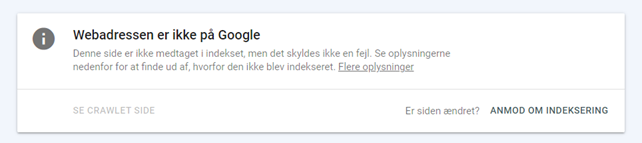
For the record, you live test the web address, if the results show that everything is in “perfect order”. Under the ‘Coverage’ section, click on ‘Get more information’, after which you will be greeted by a classic Google answer…
You may then repeatedly request indexing, but without success.
What does it mean that a page is indexed?
Indexing a page means that it has been visited by a search engine crawler (e.g. Googlebot), analyzed for content and relevance. If it meets the quality requirements, it is then added to the search engine’s index.
In short, the index is a huge database of all the pages that the search engine knows about. When a user performs a search, the search engine searches its index to find the most relevant pages that match the search query.
Why isn’t my website showing up on Google?
If your website isn’t showing up on Google, it could be for a number of reasons. The most common reason is that Google hasn’t had a chance to crawl and index your website yet. This could happen if the website is new, has a low crawl budget, or if there are technical issues that are preventing Googlebot from accessing the pages.
How do I get my website indexed?
To get your website indexed, you first need to make sure it is accessible and can be found by search engines. The best way to do this is to create and submit a sitemap to Google Search Console.
But that’s not the only thing.
To improve your chances, there are some strategies that you can make use of.
Do you have control over your foundation?
Before we dive into the different strategies, it’s important to double-check your current content. It can also be a very good idea to examine the technical aspects of the rest of your website.
The strategies do not guarantee 100% that your content will be listed in Google immediately, but they significantly increase your chances if the right conditions are present.
That being said, we recommend that you actively work with:
-
- Remove or noindex redundant content
-
- Get the page title and meta description in place
-
- Create a user-friendly page navigation and structure

Remove/noindex redundant content
Just like your blog posts and sales pages, redundant content also uses Google’s crawl budget on your website. Depending on your server solution and content, Google’s crawlers may run out of budget before they reach your new content.
Get the page title and meta description in place
Your page’s metadata tells Google’s crawler what your page content is about. Google strives to show its users results, which a page with empty metadata disputes. Therefore, you should get the title, description, and your keyword that the page should rank for in place.
Create a user-friendly page navigation and structure
Make sure your website has a user-friendly design and is easy to navigate. This will help Google’s crawler crawl your site more easily and index your content faster. Most importantly, user-friendly navigation improves the user experience for your visitors, which helps you in the RankBrain factors.
Once you have double-checked the on-page SEO of your page content and have mastered the above elements, you are ready to try out the 5 strategies.
Strategy 1: Internal link building
Internal links on websites have become increasingly important when it comes to indexing over the past few years. Internal links are important because they help Google understand and rank your website content.
They give Google’s crawler descriptive anchor text and links to follow. These make it much easier for Google to know which pages are important and what they are about.
When it comes to internal links, unfortunately, there is no magic number for how many links you need to get your content indexed. It basically depends on the number of pages on your website.
We recommend that you get as many relevant internal links to the page as possible. Always remember to keep the user experience and customer journey in mind when doing internal link building.
-
- Select the new page’s keyword as anchor text
-
- Switch between a few relevant anchor texts if you have many pages
-
- Only create natural internal links
-
- Only 1 internal link per page linking to your new page
-
- Remember navigation links (e.g. menus)
- Feel free to supplement with a few external backlinks
Strategy 2: Sitemaps and daily publishing
For new blogs or old blogs that haven’t been updated in a while, the typical problem will be your crawl budget. A possible solution to this problem is to convince Google that you are publishing content daily.
You should plan at least 3 posts per day and 5-8 hours apart. Once you have published an article, you should resubmit a sitemap of your website to Google. You do this in the sitemaps section under Index.
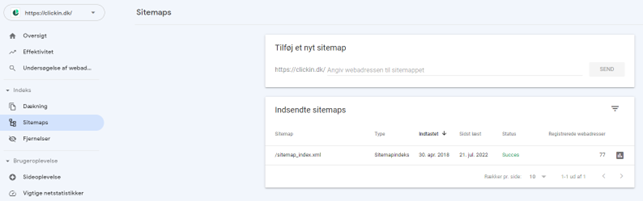
You will typically need to specify something like ‘sitemap.xml‘ or ‘sitemap_index.xml‘ etc. How your sitemap is expressed depends on whether you use SEO plugins like Yoast, RankMath or something completely different.
NB: We recommend that you arm yourself with patience for about 1-2 weeks when trying out this strategy.
Strategy 3: URL change
This strategy is probably the simplest of them all. As the name suggests, you just need to make a change to the URL of the selected page. We have personally had very limited success with this strategy, so we recommend that you try the other strategies.
ATTENTION! It is important that you are aware of 404 errors and fix them.
Strategy 4: Rank Math Instant Indexing
If you have a WordPress (WP) website, we recommend that you go with this strategy. In addition to their SEO plugin, Rank Math has also developed a special plugin for instant indexing. You do not need to have the Rank Math SEO plugin for this to work.
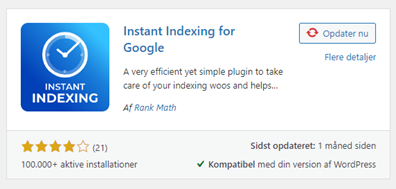
Below we will walk you through how to set up the plugin to work properly. Setup is straightforward and requires no coding.
-
- Find and download Rank Math Instant Indexing
-
- Go to the Google Cloud platform
-
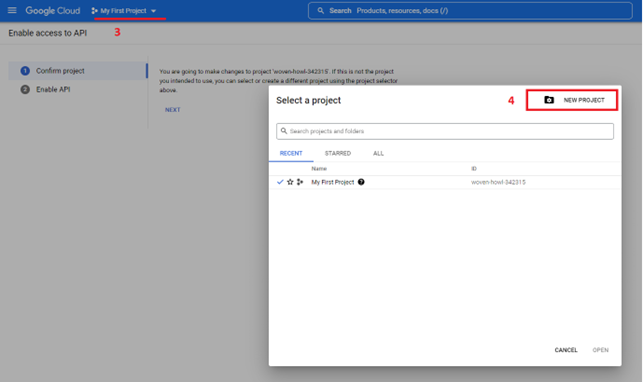
- Click on ’My First Project’
-
- Then create a new project
-
- Give your project a name and then click ’Create’
-
- Click on ‘Next‘ and then on ‘enable‘
-
- Create a Service Account for the Cloud platform
-
- Choose your project
-
- Click at ’Create Service Account’
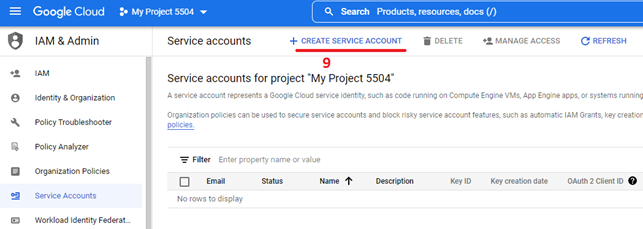
-
- Fill in the name
-
- And copy your Service Account ID
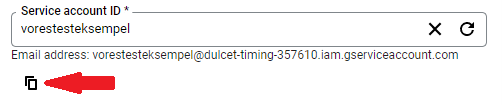
-
- Then click the ‘Create and continue‘ button.
-
- Then click on the blue ‘Done‘ button.
-
- Find the item ‘Action‘ and select ‘Manage keys‘

-
- Click on ‘Add key‘ and select create a new key
-
- Then select JSON and click ’create’
-
- Keep the key in an easy and safe place where you can find it.
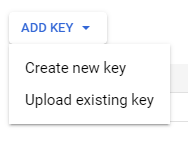
-
- Go to Google Search Console and select your page
-
- Select settings and then ‘Users and permissions‘
-
- Add a new user
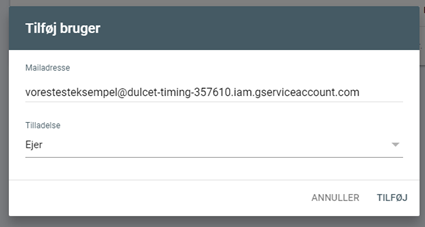
-
- insert your service account ID in the email address
-
- Selects ‘Owner‘ in permission
-
- Go back to your WP website and find the Rank Math plugin
-
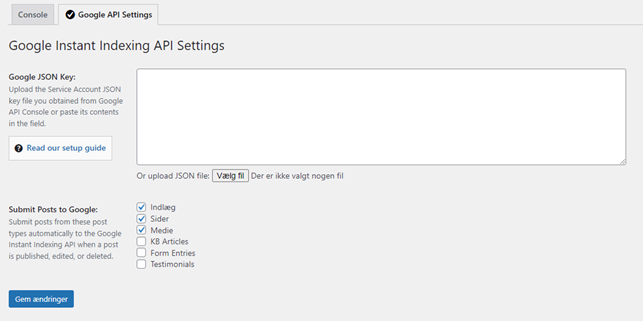
- Select Instant Indexing
-
- Select the type of content you want to be indexed.
-
- Click on ‘Choose file‘ and upload your JSON key
-
- Fill in the blank field and click save.
-
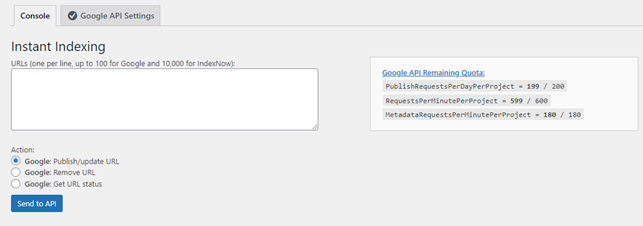
- Go to Consol and select ‘Publish/update URL‘
-
- Insert your new page URL and click ’Send to API’
-
- If you have completed the guide correctly, you will receive a ‘Success‘ message.

This strategy will probably be your go-to strategy when it comes to indexing if you have a WP website. Even if the API reports success, you are not guaranteed that your page has been indexed.
It can happen on the first request or the fifth, but one thing is for sure, and that is that you are more likely to get your content on Google and faster, rather than waiting months to get in on the action.
Strategy 5: Google API Indexing through Google Colab
The last strategy is very similar to #4 in the progression. If your website is not a WP website, we recommend that you use this strategy. Unlike strategy 4, we do not use a plugin to do the job, but rather some code from Google Search Central.
Before you embark on this strategy, you should:
-
- Create a project in Google Cloud Platform
-
- Activate the project
-
- Create a Service Account
-
- Generate and download a JSON key
-
- Give your Service Account ownership permissions in Google Search Console
Please see Strategy 4 for step-by-step guidance through the above sections. Once you have everything in place, it’s time to move on to Strategy 5.
-
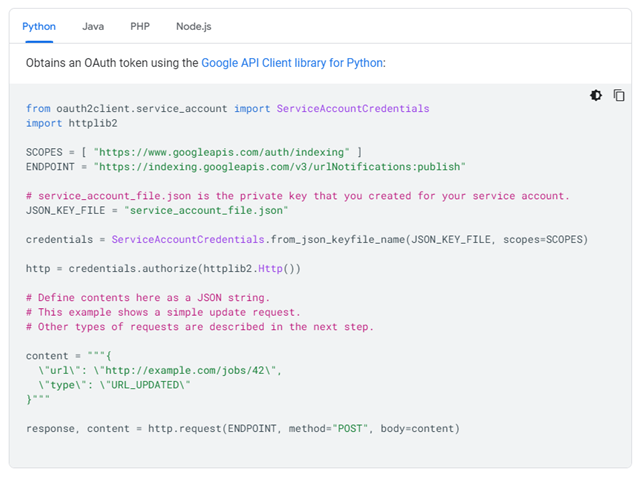
- Go to Google Search Central and then to Indexing API
-
- Select Python and copy the code
-
- Go to Google Colab and create a new notebook
-
- Paste the code and insert the following on the first and second lines below the final ‘Response, content…‘ line:
-
- Print(response)
-
- Print(content)
-
- Replace the example “http://example.com/jobs42” with your desired URL
-
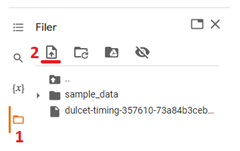
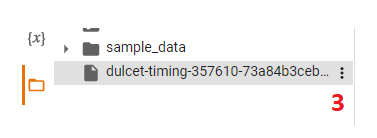
- Click on the file folder icon on the left (1) and upload your JSON key (2)
-
- Find your JSON and click on the dots (3)
-
- Select copy path
-
- Replace the example ‘service_account_file.json‘ with the path of your key.
-
- Once you have inserted the path, click the ‘Play icon‘ at the top of the text field

-
- Go down to your output (results) and follow the navigation bar to the right until you find the status section. Depending on the book, you will get a status of 200, which means your request was successful.

As with strategy 4, you are not guaranteed indexation right away, but the odds are in your favor! We recommend that you submit a request and monitor your page regularly to see if it has been indexed. If it has not, you should submit a request again.
You can make a batch of up to 100 requests in one shipment, meaning if you have multiple pages, you can easily update them all at once.
With all this served on a digital silver platter, we wish you good luck with your SEO work! You can stay updated at any time via our newsletter or article database.